AlternateSystemLibrary – Unreal Engine
AltSystemLibrary: A Blueprint Utility Toolkit
The AltSystemLibrary is a powerful Blueprint function library that provides developers with a comprehensive suite of utility functions to streamline common operations in Unreal Engine. This toolkit is designed to enhance workflow efficiency and offer a wide range of functions for comparisons, flow control, state management, and more.
Why Choose AltSystemLibrary?
The AltSystemLibrary simplifies your Blueprint graphs by consolidating complex logic into single, easy-to-use nodes. By providing a consistent set of functions for various data types, it reduces the need for multiple, cumbersome nodes, resulting in cleaner, more readable, and efficient Blueprints. Whether you’re a solo developer or part of a large team, this library is an invaluable tool for creating cleaner code and more robust gameplay systems.
Get Started Today!
Download the AltSystemLibrary and take control of your Blueprint workflow with a suite of highly optimized and user-friendly functions..
Key Features:
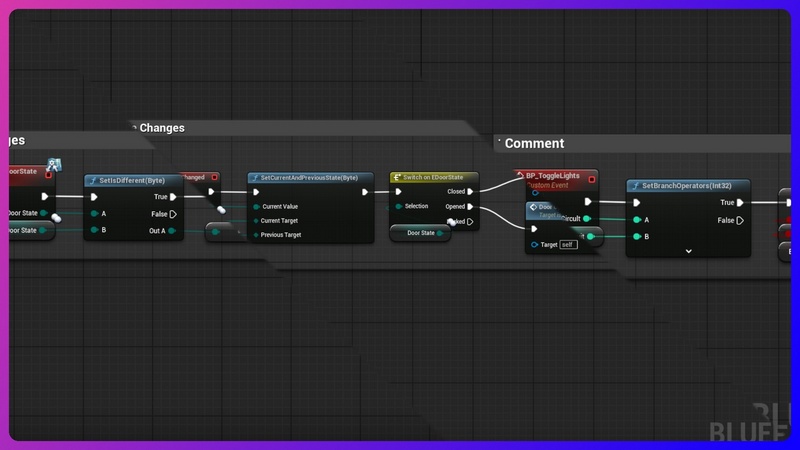
Expanded Flow Control: Go beyond the standard boolean branch node with robust comparison functions for double, int32, byte, Vector, Rotator, and UObject types. Use the SetBranchOperators nodes to perform advanced branching logic directly within your Blueprints.
Vector & Rotator Axis Manipulation: Easily manipulate and compare specific axes of vectors and rotators. With nodes like Rotator_ReplaceAxis and VectorAxis_Operators, you can precisely control individual components of these essential data types.
State Management: The Byte_CurrentAndPreviousState function provides a simple yet effective way to track the immediate past and current state of a byte value, making it perfect for finite state machines and other state-dependent logic.
Debugging & Development Tools: Includes specialized DevelopmentOnly functions like String_Print and String_PrintOnTick for quick and easy debugging. These nodes print green-colored strings to the screen, prefixed with a variable name, giving you immediate visual feedback during development.
Intuitive & Organized: All functions are organized into logical categories such as Utilities|Operators, Utilities|FlowControl, and Development, making them easy to find and use. Descriptive display names and tooltips ensure a smooth learning curve.
Number of C++ Classes: 1
Supported Development Platforms:
Windows: (Yes)
Supported Unreal Engine Versions: 5.5 – 5.7




Recent Comments